 Kpali
KpaliGuide
Buy a data bundle
Pick the plan the catalogue actually sells.
Are you keeping a phone online back home? Data bundles, delivered straight to a phone number.
Buying a bundle is choosing from a list rather than typing an amount, and the list is short enough to read properly. That is worth doing, because a bundle bought for the wrong validity is a bundle wasted.
The steps below run from an empty wallet to a receipt naming the plan.
Step by step
- Install Kpali. Kpali is coming back to Google Play and the App Store soon (Android package
app.kpali). There is no browser version — money screens gate on the device. - Fund store credit. Open Add money. Choose USDT or USDC, then the network — TRC-20 credits after twenty confirmations, BEP-20 after fifteen. The warning about the network is above the address because sending on the wrong chain cannot be undone by anyone. The minimum is shown before the address.
- Decide whose credit this is. Your email in the email field notifies you. Somebody else's email credits them instead, and they are told when it lands.
- Wait for Home. Store credit appears when the deposit confirms. An address is not money.
- Set the country. The country decides what the catalogue can sell. Home is where it starts.
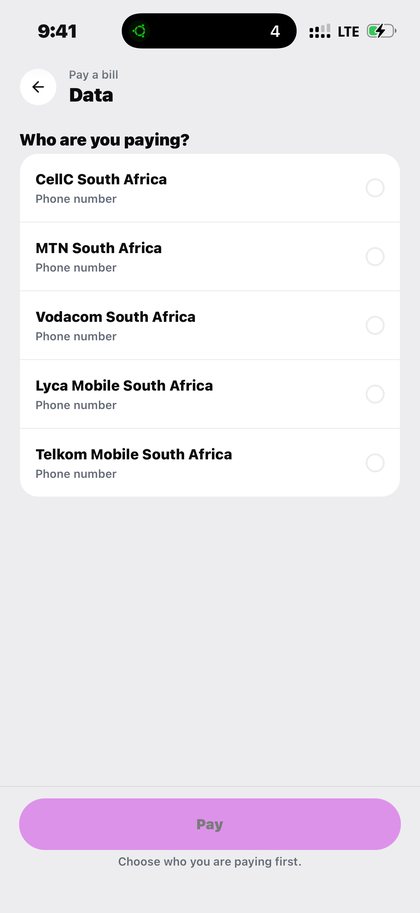
- Open Mobile data. Home → country → Data → network → plan → Pay.
- Enter the recipient. A mobile number. There is no lookup for this product, so read it back carefully.
- Read the review sheet. It states the recipient and what leaves your wallet, fee included, before anything is charged.
- Pay. If store credit cannot cover the amount plus the fee, Pay does not proceed and nothing is sent to a provider.
- Keep the receipt. The bundle lands on the number. History keeps the plan name, its validity and the delivery state.
What to expect
History names the bundle you bought, not just an amount — so you can tell a 3 GB monthly from a 1 GB weekly months later. Validity is part of the plan, so the expiry is visible where the purchase is. Store credit on Home moves by the price of the plan and nothing else.
A hard failure returns the money and says so. A pending check says only that the answer is not in yet, and retrying it is how people pay twice for one thing. On this walkthrough that matters at the last step: once you have paid for mobile data, the receipt is the thing to read, not the Pay button to press again.
What goes wrong
- Choosing on price alone and ending up with a week's validity when a month was needed.
- Assuming the new bundle adds to what is already on the line.
- Picking the network from the number's prefix rather than from what it has been ported to.
- Not reading the plan name back before paying.
What you will see
The screens here were captured from a working build, which is why they look like software rather than a brochure. These are the screens this page refers to when it says buy a data bundle. Both the light and the dark theme appear, because the app follows your phone.
- Kpali mobile data bundles for Nigeria with prices and validity (light theme)
- Choosing a mobile network for a data bundle on Kpali (light theme)
- Choosing a data network on Kpali in dark mode (dark theme)
A worked example
A worked example. Your brother in Accra is out of data and cannot get online to fix it, which is the trap: the person who needs data is the person who cannot buy it. You set the country to Ghana, open Data, pick his network, and read the plan list properly rather than sorting by price — a weekly bundle and a monthly one often carry the same size at very different prices. You choose the monthly. The review sheet names the plan, its validity and the total. You pay, keep the receipt, and the bundle lands on his number without him touching anything.
If it does not work
The plan you wanted is not listed. The operator has retired it. The list reflects what can be delivered now, not what existed last year.
The bundle arrived but the phone still has no data. Some operators require the handset to reconnect to the network. Restart it, and check the operator's own balance code.
It replaced the existing bundle instead of adding to it. That is the operator's stacking rule. Kpali sells the plan; how the operator applies it is theirs.
The validity is shorter than expected. Read the plan name back on the review sheet. Plans of the same size often come in weekly and monthly forms at different prices.
Pay is blocked. The total exceeds store credit. Fund the difference first.
Where this works
Nigeria, Ghana, South Africa and Kenya carry the deepest plan lists, but the catalogue runs far wider. Coverage for mobile data is decided per country and shown before you pay, so you find out what is possible while you are still choosing rather than after you have committed. Where it cannot be delivered today, the app says so with a reason attached.
The full picture — who it suits, what decides availability, what it costs and every question people ask — is on the Mobile data page.
Buy a data bundle. Pick the plan the catalogue actually sells.
Kpali takes no card details on this website, ever. The one payment it takes is a naira bank transfer for store credit, on /store-credit/. A page asking for a card number for Kpali is not us.
Admin URLs are intentionally absent from navigation, sitemaps and robots allow-lists.
When Claude finishes the completeness wave, real device screenshots replace the token-built phone frames without changing the red circle targets.
Get the Kpali app when it is back on Google Play and the App Store; until then, a 'Kpali' app on any store is not ours.
Create an account. You do not need a local bank account to start.
Open Add money. Read the network warning above the address. Enter the amount. The minimum is stated before you copy.
Enter an email: yours to be notified, or theirs if this deposit should credit another person.
Send the crypto on the stated network. Wait until Home shows store credit. An address is not money.
Set the country to Algeria.
Open Airtime. Home → country → Airtime → network → number → amount → Pay.
Confirm a mobile number on the review sheet. Pay is blocked if the balance cannot cover it.
Keep the receipt. Receipt + History show the number, network, amount and status.
If status is Checking, do not retry. Read the receipt. Support is email and WhatsApp.