 Kpali
KpaliSituation
Do you run multiple Gmail accounts?
Reuse the rented number inside its window instead of buying a new one every lockout.
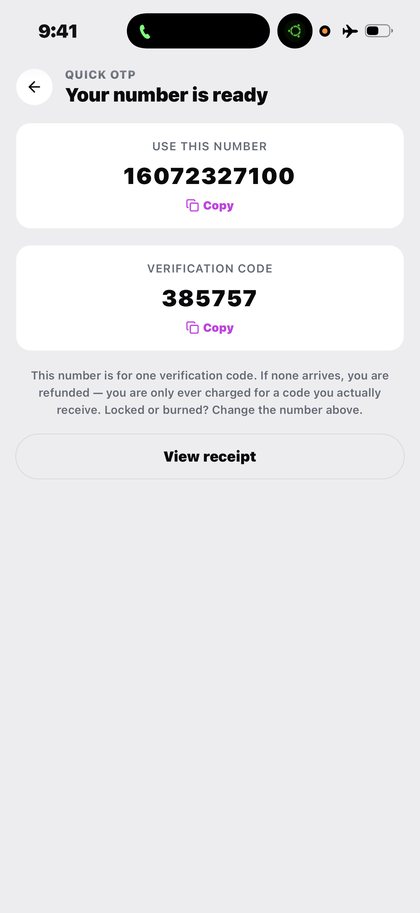
Open Quick OTP in the app after you download Kpali and fund store credit.
Reuse the rented number inside its window instead of buying a new one every lockout.
The situation
Running several accounts on one platform means verifying several times, and the cost multiplies if every verification needs a new number.
The reuse window is what changes the arithmetic. Where the platform allows it — and for Google products it frequently does, often for twenty-four hours and sometimes longer — the second and third code arrive on the number already paid for.
What Kpali does about it
Rent a real number, receive the code, reuse the window the product gives you.
Inside the app: Home → OTP → platform → country → live price → Pay → await SMS. What you are paying is rented number (timer starts after pay).
There is no lookup for this product, so the review sheet is the check — read the recipient back before you pay.
Getting there from nothing
- Install the app and create an account. No bank account and no BVN.
- Buy store credit with USDT or USDC. The minimum is stated before any address appears.
- Give it an email. Yours means you are told; theirs means they are funded.
- Wait for Home to show the credit. An address is not money.
- Home → OTP → platform → country → live price → Pay → await SMS.
- Confirm the recipient on the review sheet, then Pay. It does not proceed if store credit cannot cover the total.
- Keep the receipt. A rented number, then the code itself on the await screen and on the receipt.
Read next
- Quick OTP — the detail — how it works, what it costs, and what people get wrong
- Fund your wallet with stablecoin — the deposit screen, explained before you meet it
- Read a receipt — reading the record, including when it says wait
Every guide here describes the app. The one thing this website sells is store credit, by bank transfer, on kpali.app/store-credit/.
How to access this in the app
Home → OTP → platform → country → live price → Pay → await SMS.
How to check it
OTP await screen + receipt show the number, platform, timer and code.