 Kpali
KpaliGuide
Read a receipt
What happened, in plain words, and whether money moved.
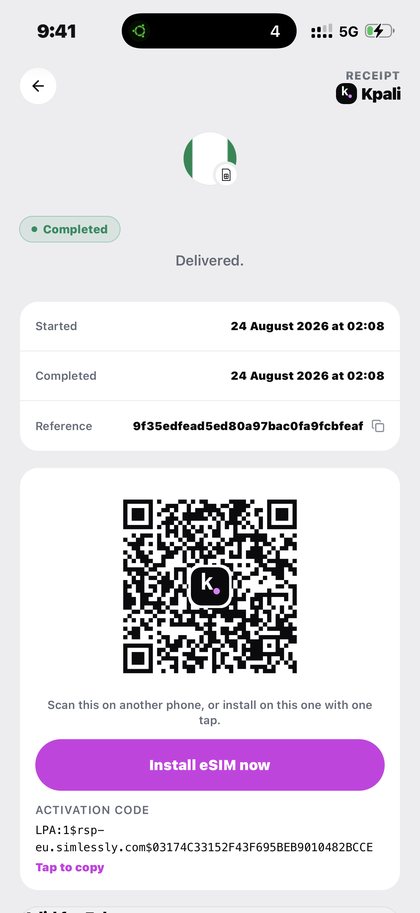
The receipt is the canonical record of what happened. Not the notification, not a screenshot, not your memory of the screen: the receipt.
It is written to answer one question honestly — did money move, and what did it buy.
Step by step
- Open the order from Home or History. Every purchase has one.
- Read the state at the top. Completed and delivered means it is done. Processing means it is paid and on its way. Checking means the outcome is not yet known.
- Read what was bought. The product, the recipient, the amount, and any artefact — a prepaid token, a gift-card code, an eSIM QR and activation code, an OTP number.
- Read the timestamps and the reference. Started and completed times, plus the reference support will ask for.
- Use Download receipt or Report a problem. The first gives you a copy to forward. The second opens the path to a person.
What to expect
The rule that matters: a definite refusal reverses the debit and says nothing has been charged. An unknown outcome stays on the receipt — do not retry. Retrying an unknown is how one purchase becomes two charges. If a receipt says it is still being checked, let it settle, and contact support with the reference if it stays that way.
What goes wrong
- Retrying a checking order.
- Keeping a screenshot and deleting the receipt, then having nothing when a code is queried.
- Reading a pending check as a failure. Status words follow whether money moved, so a pending check is never labelled Failed.
Why this matters
Most payment products tell you what they hope happened. Kpali's receipts are written to tell you what did, including when the honest answer is that it does not know yet.
That third state is the one worth understanding, because every other payment app hides it. A purchase can succeed, it can definitively fail, or it can be in a condition where the provider has not yet said which. Calling that third state Failed would be a lie that costs somebody money, because they would retry and be charged twice. Calling it Completed would be worse.
So Kpali names it, says it is being checked, and tells you not to retry. The debit stays visible, the receipt stays open, and when the provider settles, the receipt settles with it. If it stays unresolved, the reference on that receipt is what support works from.
The corresponding promise on the other side is just as firm: a definite refusal reverses the debit and says, in words, that nothing has been charged. You are never left to infer that from a balance.
Keep receipts rather than screenshots. A screenshot is an image of a claim; the receipt is the claim itself, held where it can be re-read, downloaded and quoted by reference.
Receipts are also the fastest way to get help. Support asks for the reference first, because with it a question about a payment stops being a description and becomes a record that can be looked up in seconds.
What you will see
Below are the real screens. They are shown as they render on a phone, not as a designer might prefer them. These are the screens this page refers to when it says read a receipt. Both the light and the dark theme appear, because the app follows your phone.
- A completed Kpali eSIM receipt with the install QR code (light theme)
- A completed Kpali receipt showing what was bought and that it was delivered (light theme)
- A delivered Kpali receipt in dark mode (dark theme)
- A Kpali receipt showing an order paid and on its way (light theme)
- A Kpali receipt still checking with the provider, telling you not to retry (light theme)
Questions
What does moneyMoved mean?
It is the honest answer to the only question that matters: did money actually leave. Status words follow it rather than following mood.
Why should I not retry a checking order?
Because the outcome is unknown, not failed. Retrying an unknown is how one purchase becomes two charges.
How long can something stay checking?
Until the provider settles it. If it stays that way, contact support with the reference.
Can I forward a receipt?
Yes — Download receipt gives you a copy. For school fees that copy is the point of the purchase.
Read next
- History, status and expiry — finding a purchase months later, and where expiry lives
- Get support — the questions answered in full, and the path to a person
- Check your balance — what the number on Home actually is, and what it is not
- Buy a gift card — a code on the receipt, and the country that governs it
This is documentation for software you install. The one page here that takes money is /store-credit/: a bank transfer, never a card.
This guide describes the app. The one page here that takes payment is store credit by bank transfer; no page asks for a card.
Read a receipt. What happened, in plain words, and whether money moved.
Kpali takes no card details on this website, ever. The one payment it takes is a naira bank transfer for store credit, on /store-credit/. A page asking for a card number for Kpali is not us.
Admin URLs are intentionally absent from navigation, sitemaps and robots allow-lists.
When Claude finishes the completeness wave, real device screenshots replace the token-built phone frames without changing the red circle targets.
Get the Kpali app when it is back on Google Play and the App Store; until then, a 'Kpali' app on any store is not ours.
Create an account. You do not need a local bank account to start.
Open Add money. Read the network warning above the address. Enter the amount. The minimum is stated before you copy.
Enter an email: yours to be notified, or theirs if this deposit should credit another person.
Send the crypto on the stated network. Wait until Home shows store credit. An address is not money.
Set the country to Algeria.
Open Airtime. Home → country → Airtime → network → number → amount → Pay.
Confirm a mobile number on the review sheet. Pay is blocked if the balance cannot cover it.
Keep the receipt. Receipt + History show the number, network, amount and status.
If status is Checking, do not retry. Read the receipt. Support is email and WhatsApp.