 Kpali
KpaliSituation
Are other OTP apps getting rejected as VoIP?
Customer report: numbers from Kpali received Facebook codes where other apps showed VoIP errors.
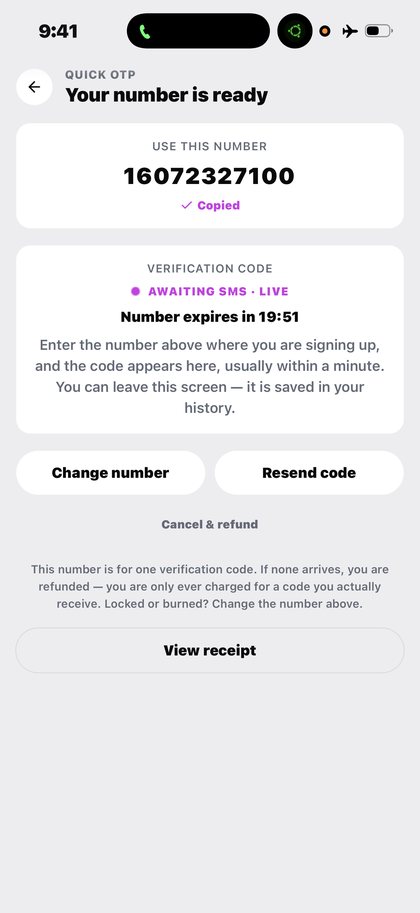
Open Quick OTP in the app after you download Kpali and fund store credit.
Customer report: numbers from Kpali received Facebook codes where other apps showed VoIP errors.
The situation
The rejection is specific and maddening: the number is accepted, then refused as VoIP, with no explanation of what would be accepted instead.
Platforms that run this check are refusing the underlying line type, not the person. A customer's account of this is on the trust page — numbers from other services were refused where Kpali numbers received the codes.
What Kpali does about it
Rent a real number, receive the code, reuse the window the product gives you.
The steps are: Home → OTP → platform → country → live price → Pay → await SMS. The recipient is rented number (timer starts after pay).
There is no lookup for this product, so the review sheet is the check — read the recipient back before you pay.
Getting there from nothing
- Install Kpali. Opening an account asks for nothing a bank would ask for.
- Fund it with stablecoin on a chain your sending wallet actually supports.
- The email field decides whose store credit this becomes. Choose it on purpose.
- Home updates on confirmation. Until then you have sent something, not received it.
- Home → OTP → platform → country → live price → Pay → await SMS.
- Confirm the recipient on the review sheet, then Pay. It does not proceed if store credit cannot cover the total.
- Keep the receipt. A rented number, then the code itself on the await screen and on the receipt.
Read next
- Quick OTP — the reference page, with coverage, cost and the honest limits
- Fund your wallet with stablecoin — funding, and why the network warning sits where it does
- Read a receipt — why an unknown outcome is not a failure
Everything described happens in the app. The website is the manual, with one exception: store credit by bank transfer on kpali.app/store-credit/.
How to access this in the app
Home → OTP → platform → country → live price → Pay → await SMS.
How to check it
OTP await screen + receipt show the number, platform, timer and code.