 Kpali
KpaliGuide
Check your balance
The home number is what you hold — store credit, not a bank app.
The large number on Home is store credit in USD. It is what the app can actually spend, and it is not a bank balance — no bank is involved anywhere in it.
Step by step
- Open Home. The figure under
USD store creditis what you hold. - Tap the eye to hide it. Useful on a shared screen or in public. Hiding it changes the display and nothing else.
- Open Wallet for the same number with its controls. Add money and Send sit beside it.
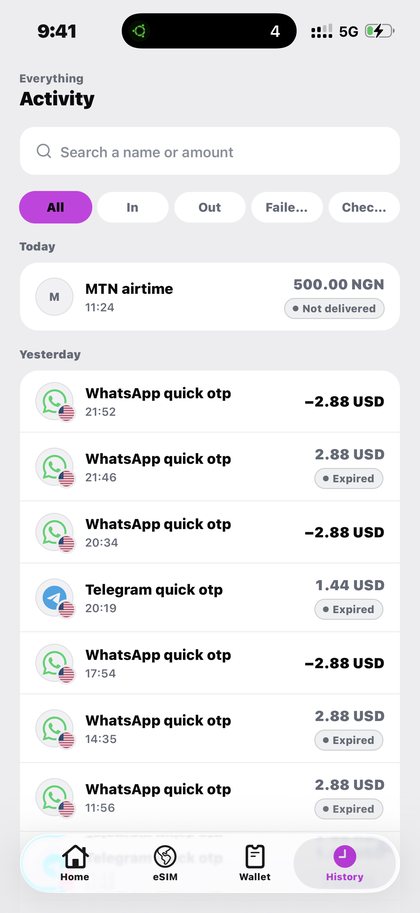
- Compare with History. History is the same list of events as the Home preview. Store credit before, minus what you spent, is store credit after — every time.
What to expect
If a naira estimate is unavailable, the app says so and states plainly that your USD store credit is unaffected. A missing figure means Kpali has not heard a rate, not that you have nothing.
What goes wrong
- Reading an estimate as the balance. The USD figure is the balance.
- Assuming a deposit that has not confirmed is spendable.
- Expecting Pay to work when store credit cannot cover the amount plus the fee. It will not proceed, and no provider is called.
Why this matters
Store credit is the only number in Kpali that decides anything. Every purchase checks against it, every Pay button gates on it, and every receipt is reconcilable against it.
It is deliberately not dressed up. There is no projected balance, no pending-but-spendable figure, and no credit line. What Home shows is what the app can spend right now, which is why a deposit that has not confirmed does not appear there — an address is not money, and a number that included unconfirmed funds would be a number that lied.
The naira estimate beside it is exactly that: an estimate, offered as a convenience. When a rate has not been heard the app says the estimate is unavailable and states plainly that your USD store credit is unaffected. A missing convenience is never allowed to look like a missing balance.
One habit is worth forming: check Home before a purchase and after it. The difference is the purchase, every time, with no rounding and nothing withheld. It takes two seconds and it means you never have to trust a summary screen to know what something cost you.
What you will see
Screens follow, taken directly from the app so nothing here flatters it. These are the screens this page refers to when it says check your balance. Both the light and the dark theme appear, because the app follows your phone.
- Kpali home screen with store credit and recent activity (light theme)
- Kpali home screen in dark mode with store credit and recent activity (dark theme)
- Kpali wallet showing USD store credit with Add money and Send (light theme)
- Kpali wallet in dark mode showing store credit (dark theme)
- Kpali history listing every purchase with its status (light theme)
- Kpali history showing money added to store credit (light theme)
Questions
Why is a naira estimate missing?
Because no rate has been heard. Your USD store credit is unaffected, and the app says so rather than showing a number it cannot stand behind.
Is store credit a bank balance?
No. No bank is involved anywhere in it.
Why can I not pay when the balance looks big enough?
Pay checks the amount plus the fee. If the total exceeds store credit it does not proceed, and no provider is called.
Where did my deposit go?
If Home has not moved, the deposit has not confirmed yet. An address is not money.
Read next
- Fund your wallet with stablecoin — the one step that cannot be undone, in the order the screen asks it
- History, status and expiry — finding a purchase months later, and where expiry lives
- Read a receipt — the three states, and why one of them means do nothing
- PIN, biometrics and staying safe — device risk, chain risk, and the impersonation that costs most people money
The steps live in the app. The website explains them first, and sells store credit by bank transfer on kpali.app/store-credit/.
This guide describes the app. The one page here that takes payment is store credit by bank transfer; no page asks for a card.
Check your balance. The home number is what you hold — store credit, not a bank app.
Kpali takes no card details on this website, ever. The one payment it takes is a naira bank transfer for store credit, on /store-credit/. A page asking for a card number for Kpali is not us.
Admin URLs are intentionally absent from navigation, sitemaps and robots allow-lists.
When Claude finishes the completeness wave, real device screenshots replace the token-built phone frames without changing the red circle targets.
Get the Kpali app when it is back on Google Play and the App Store; until then, a 'Kpali' app on any store is not ours.
Create an account. You do not need a local bank account to start.
Open Add money. Read the network warning above the address. Enter the amount. The minimum is stated before you copy.
Enter an email: yours to be notified, or theirs if this deposit should credit another person.
Send the crypto on the stated network. Wait until Home shows store credit. An address is not money.
Set the country to Algeria.
Open Airtime. Home → country → Airtime → network → number → amount → Pay.
Confirm a mobile number on the review sheet. Pay is blocked if the balance cannot cover it.
Keep the receipt. Receipt + History show the number, network, amount and status.
If status is Checking, do not retry. Read the receipt. Support is email and WhatsApp.