 Kpali
KpaliGuide
Fund someone else's wallet
Put their email on the deposit screen. They are notified when it lands.
Funding
What can put money on a Kpali balance today.
Store credit is funded with stablecoins. That is the point of Kpali: no Nigerian bank account and no BVN stands between you and a paid bill.
USDT · TRC-20 (TRON)
The default across Nigerian crypto users — cheapest to send and the one people already hold.
USDT · BEP-20 (BNB Chain)
Cheap, widely held, and the usual second choice after TRON.
USDC · Base
Near-zero fees. Common for people who came in through an exchange rather than P2P.
USDC · Solana
Fast and cheap. Confirmations are counted at finalisation, not first commitment.
Nigerian bank transfer
Store credit can be bought with a naira bank transfer on the store-credit page — the one page here that takes payment. Credit bought that way cannot be withdrawn; it is spent in the app.
USDT on ERC-20
Ethereum gas regularly costs more than a small top-up, so Kpali does not take deposits on that network rather than let a fee eat your money.
Minimums differ by network — TRON's is the highest because TRON's own fee floor is. The app shows the exact figure for the network you pick before you send anything.
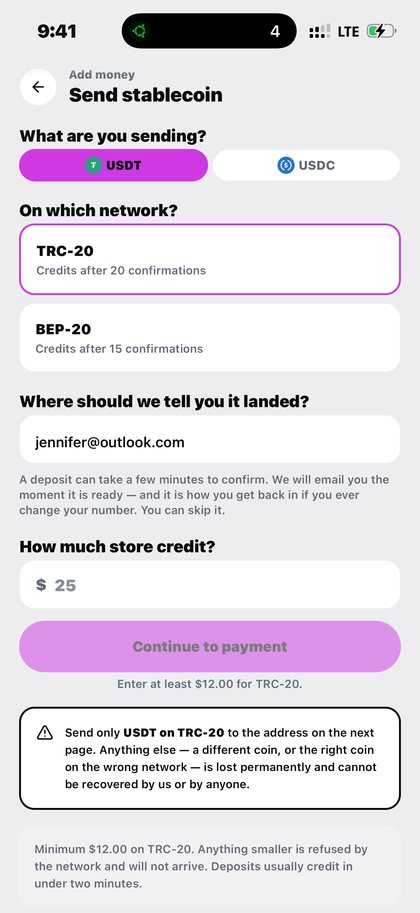
One field on the deposit screen turns funding yourself into funding somebody else, and it is the quietest useful thing in the app.
It is how a person in one country puts spendable credit into the hands of a person in another without either of them holding a bank account where the other lives.
Step by step
- Open Add money. The ordinary deposit screen. Nothing separate.
- Choose the stablecoin and the network. As you would for yourself. Read the network warning above the address.
- Put their email in the email field. Not yours. That is the whole mechanism: the address in that field is the account the store credit belongs to.
- Enter the amount and send. The minimum applies as usual.
- They are notified. When the deposit lands, they are told, and the credit is on their Home to spend.
What to expect
From that point the money is theirs. They pick their own country, their own product, and their own recipient. You are not in the transaction and cannot pull it back — which is the point of giving somebody money rather than lending them your account.
If instead you want to pay a specific bill for them, do not use this. Pay the bill directly against their meter, smartcard or account number, and the lookup will confirm the name before you pay.
What goes wrong
- Typing your own email out of habit, which credits you instead of them.
- Mistyping their address, which credits an account that is not theirs.
- Expecting to reverse it afterwards.
Why this matters
This is the feature that most surprises people, because nothing about it looks like a feature. It is one field on a screen you were already using.
What it replaces is worth naming. The usual way to get money to someone in another country is a remittance: a transfer, a fee, an exchange rate, a collection point, and a recipient who then has to convert cash into whatever they actually needed. Every step is a place to lose value and a place to wait.
Putting their email on the deposit screen skips all of it. The stablecoin you send becomes their store credit directly, and they spend it on the bill, the airtime or the eSIM they actually wanted. Nobody queues, nobody converts, and there is no collection point.
It also means you do not need to know what they need. Sending someone store credit is sending them the ability to choose, which is a different and usually better gift than sending them a specific product.
A note on trust, since this feature involves giving up control. Once the deposit credits their email, the store credit is theirs completely: you cannot spend it, redirect it, or claw it back. That is not a limitation to work around, it is the entire point. If what you actually want is to pay a specific bill rather than hand over spendable value, do that instead — pay their meter, their smartcard or their account number directly, and let the lookup confirm the name before the money moves. Both routes are legitimate. They are simply answers to different questions, and it is worth knowing which one you are asking.
One practical detail people ask about: use the email address they actually check. The notification that their money has arrived goes there, and if they ever need to recover access to the account, that same address is the route back in. An address they abandoned two years ago will still receive the credit, and will still be the only way back to it.
What you will see
These are app captures. If a screen looks plain, that is because it is plain in the app too. These are the screens this page refers to when it says fund someone else's wallet.
- Kpali Add money screen choosing USDT and the TRC-20 network with the wrong-network warning
Questions
Do they need to be a Kpali user already?
They need the app to spend it. The email is what the credit attaches to.
Can I take it back?
No. It is their store credit from the moment it lands.
Will they know it came from me?
They are told the deposit arrived. If you want them to know it was you, tell them.
Can I fund several people at once?
One deposit credits one email. Do them separately so each has its own record.
Read next
- Fund your wallet with stablecoin — the one step that cannot be undone, in the order the screen asks it
- Check your balance — what the number on Home actually is, and what it is not
- Buy and send airtime — country, network, number, amount
- Pay electricity — token or postpaid — the lookup that stops you paying a stranger's meter
These pages exist to make the app obvious. Store credit is the only thing sold here, by bank transfer, and spent in the app.
This guide describes the app. The one page here that takes payment is store credit by bank transfer; no page asks for a card.
Fund someone else's wallet. Put their email on the deposit screen. They are notified when it lands.
Kpali takes no card details on this website, ever. The one payment it takes is a naira bank transfer for store credit, on /store-credit/. A page asking for a card number for Kpali is not us.
Admin URLs are intentionally absent from navigation, sitemaps and robots allow-lists.
When Claude finishes the completeness wave, real device screenshots replace the token-built phone frames without changing the red circle targets.
Get the Kpali app when it is back on Google Play and the App Store; until then, a 'Kpali' app on any store is not ours.
Create an account. You do not need a local bank account to start.
Open Add money. Read the network warning above the address. Enter the amount. The minimum is stated before you copy.
Enter an email: yours to be notified, or theirs if this deposit should credit another person.
Send the crypto on the stated network. Wait until Home shows store credit. An address is not money.
Set the country to Algeria.
Open Airtime. Home → country → Airtime → network → number → amount → Pay.
Confirm a mobile number on the review sheet. Pay is blocked if the balance cannot cover it.
Keep the receipt. Receipt + History show the number, network, amount and status.
If status is Checking, do not retry. Read the receipt. Support is email and WhatsApp.