 Kpali
KpaliGuide
Download the Kpali app
Get Kpali on a phone. Everything except buying store credit happens there.
Kpali is a phone app. The website sells one thing — store credit, by naira bank transfer, on kpali.app/store-credit/ — and everything that credit buys is bought in the app: money screens gate on the device, and a browser is the wrong place to hold somebody's store credit.
These pages exist to teach the app. Everything they describe happens on a handset.
Step by step
- Wait for the store listing. Kpali is coming back to Google Play and the App Store soon. Until then there is no listing to install from, so a 'Kpali' app on any store today is not ours. The download page here says when it is back.
- Check the name and the publisher. Kpali is published by First Flip Ltd. Money apps attract impostors — read the publisher line before you install anything.
- Install and open it. The app opens on a welcome screen with Face ID and a four digit PIN. Nothing is asked of you that a bank would ask: no BVN, no bank account, no proof of address to get started.
- Create your account. A PIN and a way to reach you is the whole of it. The account exists so store credit has somewhere to live.
- Add your email under Add money. This is the step people skip and regret. The email is how you are reached, and how access is recovered if your phone number ever changes.
What to expect
Once the app is installed, the order of operations never changes: fund store credit, then spend it. An address is not money, and store credit is what the app actually spends.
What goes wrong
- Installing a lookalike. Check the publisher.
- Skipping the email, then having no recovery path later.
- Waiting for a web version of the app that is not coming. The website sells store credit on one page; it does not run the app.
Why this matters
Kpali is pidgin for passport, and the name is doing real work. A passport is not the journey; it is the thing that makes the journey possible, and it works because it is recognised somewhere other than where it was issued. Store credit funded with stablecoin behaves the same way: it is recognised in 182 countries because it never depended on a bank in any single one of them.
That is why the install is so short. There is nothing to verify, because there is no bank account being opened. The friction most financial apps front-load — documents, a bank link, a waiting period — does not exist here, and it does not exist because of an architectural choice rather than a lax one.
One last thing about the absence of a web version, since it is the question this site gets asked most. A browser is a shared, scriptable, extension-laden environment that the person using it does not fully control. A phone app can gate every money screen behind the device's own biometric hardware, and it can refuse to proceed when the balance will not cover the total. Those guarantees are not available in a tab, and Kpali would rather not offer them than offer them weakly. This website — every guide, every country page, every product hub — exists to teach an app it deliberately cannot replace. Its one exception is deliberate too: kpali.app/store-credit/ takes a naira bank transfer for store credit, because a bank transfer needs no card and no secret typed into a tab, and the credit it buys is spent in the app and cannot be withdrawn.
If you are reading this on a laptop and wondering what to do next, the honest answer is: open it on your phone. Search your store for Kpali, check that the publisher reads First Flip Ltd, and install it. Everything else on this website is here to be read before or after that, not instead of it.
What you will see
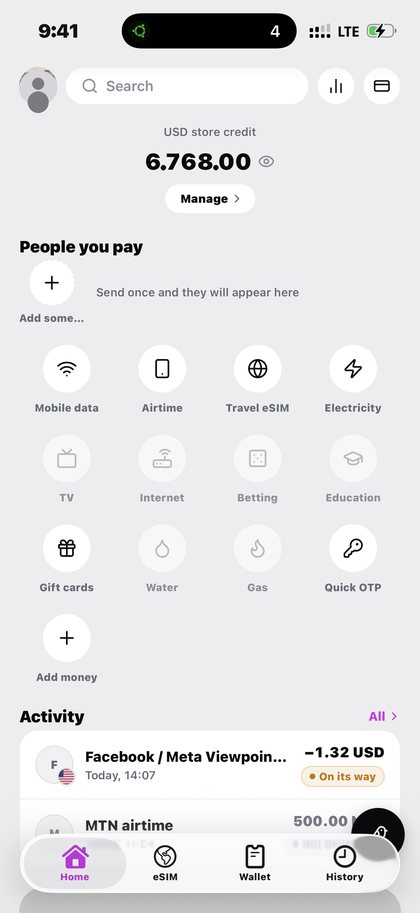
These come straight out of the app. Nothing has been redrawn to look tidier than it is. These are the screens this page refers to when it says download the kpali app. Both the light and the dark theme appear, because the app follows your phone.
- Kpali home screen showing USD store credit and all twelve product tiles (light theme)
- Kpali home screen in dark mode showing store credit and every product tile (dark theme)
- Kpali home screen showing USD store credit and all twelve product tiles (light theme)
- Kpali home screen in dark mode showing store credit and every product tile (dark theme)
Questions
Is there a web version?
No. The one thing kpali.app sells is store credit, by bank transfer, on one page; spending it happens in the app, because money screens gate on the device.
Which package is the Android app?
app.kpali, published by First Flip Ltd.
Do I need documents to install it?
No. No BVN, no bank account, no proof of address.
Does it cost anything to install?
No. You pay only for what you buy inside it.
Read next
- Create a Kpali account — the PIN, the biometrics and the email that recovers your access
- Fund your wallet with stablecoin — the one step that cannot be undone, in the order the screen asks it
- Check your balance — what the number on Home actually is, and what it is not
- PIN, biometrics and staying safe — device risk, chain risk, and the impersonation that costs most people money
The instructions above are for the app. The only payment this site takes is a naira bank transfer for store credit, on one page.
This guide describes the app. The one page here that takes payment is store credit by bank transfer; no page asks for a card.
Download the Kpali app. Get Kpali on a phone. Everything except buying store credit happens there.
Kpali takes no card details on this website, ever. The one payment it takes is a naira bank transfer for store credit, on /store-credit/. A page asking for a card number for Kpali is not us.
Admin URLs are intentionally absent from navigation, sitemaps and robots allow-lists.
When Claude finishes the completeness wave, real device screenshots replace the token-built phone frames without changing the red circle targets.
Get the Kpali app when it is back on Google Play and the App Store; until then, a 'Kpali' app on any store is not ours.
Create an account. You do not need a local bank account to start.
Open Add money. Read the network warning above the address. Enter the amount. The minimum is stated before you copy.
Enter an email: yours to be notified, or theirs if this deposit should credit another person.
Send the crypto on the stated network. Wait until Home shows store credit. An address is not money.
Set the country to Algeria.
Open Airtime. Home → country → Airtime → network → number → amount → Pay.
Confirm a mobile number on the review sheet. Pay is blocked if the balance cannot cover it.
Keep the receipt. Receipt + History show the number, network, amount and status.
If status is Checking, do not retry. Read the receipt. Support is email and WhatsApp.