 Kpali
KpaliOne-time codes
Quick OTP
Do you need a real number that actually receives OTPs? Rent a real number, receive the code, reuse the window the product gives you.
How to access
Home → OTP → platform → country → live price → Pay → await SMS.
Recipient Rented number (timer starts after pay)
How to check OTP await screen + receipt show the number, platform, timer and code.
The app is the till — this page never takes payment. Store credit alone is sold on this site, by bank transfer on one page.
What it is
Quick OTP on Kpali is a specialized cellular number rental service designed to solve the growing friction of multi-platform authentication and account access. In the modern digital landscape, verifying an identity via a One-Time Password (OTP) delivered via SMS has become a standard security requirement. However, obtaining a reliable physical number for verification can be incredibly challenging, particularly when dealing with regional blocks, privacy concerns, or security lockouts. Kpali addresses this by providing users with the ability to rent real, physical mobile numbers rather than virtual Voice over Internet Protocol (VoIP) numbers.
Unlike standard virtual numbers offered by many online services, Kpali's catalog consists of genuine cellular lines. This distinction is critical because major platforms—such as Facebook, Google, and various banking networks—employ advanced security filters that detect and reject VoIP numbers to prevent automated bot registrations and spam. Because Kpali coordinates with global cellular infrastructure, these rented numbers are recognized as standard, legitimate physical carrier subscriptions, passing strict platform filters and receiving verification codes successfully.
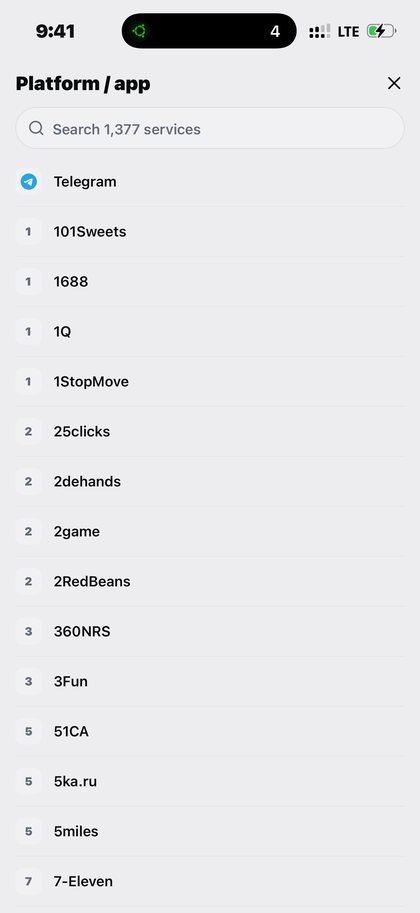
The service is built around a fully dynamic catalog. Rather than restricting users to a handful of hardcoded services, Kpali utilizes two highly searchable dropdown menus directly within the application: one for the target Platform (such as Facebook, Gmail, Telegram, or WhatsApp) and another for the physical Country of the number. The app queries Kpali's global routing table in real-time to retrieve a live price from the server based on current provider availability and carrier routing fees.
Crucially, Quick OTP is not a utility bills payment form. Users must not confuse this section of the app with forms meant for electricity, internet, or television. It is a distinct, dedicated numbering workspace where a temporary line is leased for the sole purpose of SMS verification.
To ensure a transparent user experience, Kpali does not offer any "instant" delivery guarantees, as cellular networks are subject to external routing conditions beyond the platform's control. If a specific platform-country combination is temporarily out of capacity or experiencing connectivity drops at the carrier level, the user interface will represent this as a grey tile. This grey tile represents honest unavailability; Kpali chooses to show when a service is temporarily inactive rather than taking a payment for an SMS routing path that cannot be successfully completed. If the store credit in the user's wallet cannot cover the live price of the rental, the system's balance gate will automatically block the transaction from proceeding, ensuring no funds are locked or misallocated.
Who it is for
The Quick OTP service is engineered for a diverse range of users who require reliable, non-VoIP SMS verification across international boundaries.
First and foremost, it is for individuals experiencing platform-specific verification failures. A common customer pain point involves users attempting to create or verify accounts on platforms like Facebook, only to have their virtual numbers rejected due to strict VoIP detection systems. These users turn to Kpali because Kpali's physical number catalog consistently bypasses VoIP blocks and receives codes successfully.
Second, the service is a vital resource for users facing Gmail or Google account lockouts. When security protocols lock a user out of an essential email address and require verification via a fresh cellular number, obtaining an active, legitimate number quickly is often the only path to recovery. Kpali provides a temporary, secure number to receive the necessary lockout recovery code.
Third, the platform serves global digital workers, software developers, and quality assurance testers. Teams building multi-regional applications often need to test localized sign-up flows, SMS delivery pipelines, and international carrier routing without physically purchasing hundreds of local SIM cards or maintaining expensive roaming subscriptions. Quick OTP allows these teams to simulate authentic user experiences across dozens of target countries seamlessly.
Fourth, it is designed for privacy-conscious individuals who wish to keep their personal, primary telephone number confidential. By renting a short-term number, users can register on secondary platforms and protect themselves against marketing lists, data breaches, and unsolicited spam calls, while still complying with the SMS verification requirements of the services they use.
Kpali provides these numbers purely within the boundaries of legal compliance and the terms of service of the target applications. The platform does not ask, suggest, or encourage users to break any platform's rules or bypass security policies. It simply offers a real cellular alternative for legitimate verification purposes where standard VoIP solutions fail.
How to access it in the app
Kpali is built as a native mobile application. To maintain a secure, sandboxed environment and direct control over the cryptographic transactions and carrier sessions, there is no web till or browser-based portal for buying numbers; the one thing the website sells is store credit, by naira bank transfer, on kpali.app/store-credit/.
To access Quick OTP, users must first download the official application. On Android devices, this is accomplished by searching for the official package name app.kpali on the Google Play Store. Users should verify the package name carefully to ensure they are installing the genuine application and avoiding unauthorized clones.
Once the application is successfully installed and opened on a mobile device, navigating to the OTP rental workspace is highly intuitive. The navigation path is defined as:
Home → OTP → platform → country → live price → Pay → await SMS.
Upon launching the app, the user is presented with the primary Home dashboard, which displays their current store credit. From this dashboard, the user taps the "OTP" menu tile to enter the dedicated number-rental workspace.
Inside this workspace, the interface displays two prominent, searchable dropdown inputs. In the first dropdown, the user searches for and selects the desired third-party service or platform (e.g., "Facebook" or "Gmail"). In the second dropdown, the user selects the target geographic country for the telephone number. If a particular selection is represented by a grey tile, it indicates honest unavailability due to carrier capacity limits; the option cannot be selected until routing is restored.
Once both selections are made, the application contacts the server to calculate and display the live price for that specific session. If the user decides to proceed, they tap the "Pay" button to initiate the balance gate check and move to the await SMS screen.
How to buy (deposit → pay → receipt)
Purchasing an OTP rental on Kpali follows a clear, step-by-step financial flow: deposit, pay, and receipt. Since there is no integrated credit card till or bank-based payment processor, all transactions are settled using store credit funded via cryptocurrency.
Step 1: Deposit
To fund their Kpali wallet, the user navigates to the deposit screen in the app. The user first inputs the deposit amount they wish to credit. The system then generates a unique cryptocurrency deposit address.
Before the user can copy this address, the application displays a prominent, critical network warning directly above the wallet address. This network warning contains essential information regarding the specific blockchain network (such as TRON, Ethereum, or BNB Chain) that must be used for the transfer. Transferring funds on an incorrect blockchain network or using an unsupported chain cannot be undone, and the funds will be permanently lost.
A minimum deposit limit is also clearly stated on the screen before the user copies the address. To track the deposit, the user must input an email address. The user can enter their own personal email address to receive transaction receipts, or they can enter another recipient's email address if they are funding the wallet on behalf of someone else. Once the transaction is completed on the blockchain, the user must wait until the store credit appears on their Home dashboard. An address is not money; the transaction must be fully validated and cleared on the blockchain before Kpali credits the account.
Step 2: Pay
Once the store credit is reflected on the Home screen, the user can proceed with the purchase. The user navigates to the OTP workspace, selects the platform and country, and reviews the live price fetched from the server.
When the user taps "Pay", the application activates the balance gate. This gate acts as a strict programmatic check. If the user's available store credit is less than the live price of the selected number rental, the transaction is blocked immediately. Nothing is sent to the upstream carrier gateways, and no fees are deducted. This protects the user from initiating a transaction with insufficient funds. If the balance is sufficient, the purchase is authorized, the live price is deducted from the store credit, and the active session begins.
Step 3: Receipt
Upon successful payment, the application transitions to the active verification screen and generates a digital receipt. This receipt is the permanent artifact of the transaction, recording the rented phone number, the target platform, the country of origin, the precise cost deducted, and the transaction timestamp. This receipt remains accessible in the user's transaction history as a record of the event.
How to check balance / usage / history
Monitoring account status, active sessions, and transaction records is straightforward within the Kpali mobile application.
Checking Balance
A user's current available store credit is always visible at the top of the Home dashboard. This balance is updated in real-time as deposits are credited and purchases are executed.
Checking Active Usage (The Await Screen)
When an OTP rental is active, the application displays a specialized "await SMS" screen. This screen serves as the live terminal for the current rental session. It displays:
- The assigned cellular phone number (which the user copies to paste into the target platform's registration field).
- The selected platform and country.
- A dynamic countdown timer (representing the window of time during which the cellular channel is open to receive the SMS).
- A real-time loading indicator waiting for the incoming text message.
When the SMS arrives at Kpali's cellular gateways, the verification code is extracted and displayed on this screen instantly.
Checking Transaction History
Users can review their past activity by navigating to the dedicated History tab. The app lists all OTP rental transactions and categorizes their outcomes using specific status states:
- Completed: The SMS verification code was successfully received and delivered to the user during the active session.
- Failed: No SMS was received before the countdown timer expired. In this case, Kpali automatically triggers its standard refund rail, returning the deducted live price directly to the user's store credit balance.
- Checking: This state indicates that an asynchronous query is currently checking the carrier routing table for verification details. If a transaction is in the "Checking" state, the user must not attempt a duplicate purchase or retry the operation; they should instead wait and consult the digital receipt to see the exact state of the network call.
Mistakes
To ensure a smooth experience and avoid lost time or funds, users should be aware of several critical mistakes commonly made when navigating Kpali's systems:
- Confusing OTP with the Utility Bills Form: One of the most common errors is attempting to input an OTP platform rental request or verification task into the utility payment sections of the app (such as electricity, data, or television forms). These utility forms are strictly for bill payments and are connected to completely different financial routing pipelines. Pasting an OTP platform request into these forms will result in a failed transaction or misallocated funds.
- Expecting a Web-Based Checkout: Kpali does not sell numbers in a browser. Store credit is funded with cryptocurrency in the app, or bought with a naira bank transfer on kpali.app/store-credit/ (the one page on the website that takes payment), and all purchases must occur inside the native mobile app against that credit. Any website claiming to offer direct credit card checkout for Kpali services is fraudulent.
- Ignoring Blockchain Network Warnings: Copying a deposit address and sending cryptocurrency over an incorrect or unsupported blockchain network is an irreversible error. Users must read the network warning above the generated address carefully before executing any transfer.
- Retrying During a "Checking" State: When a network query is marked as "Checking", the system is actively communicating with global SMS gateways. Initiating duplicate rental requests while a transaction is in this state will lead to unnecessary redundant charges. Users must wait for the status to resolve and review the active receipt.
- Assuming Permanent Number Ownership: Quick OTP numbers are short-term cellular leases designed strictly for the immediate reception of verification codes. They are not permanent phone numbers and cannot be used for ongoing personal voice calls or long-term text messaging.
- Disregarding Platform Terms of Service: Users must only employ rented numbers on third-party platforms where those platforms' terms of service permit the use of such numbers. Kpali is a technical provider of real cellular routing and does not encourage, ask, or instruct users to breach any external platform's guidelines.
FAQ
1. How does Kpali's number rental differ from standard VoIP services?
The primary difference lies in the underlying cellular routing technology. Standard virtual number services typically allocate Voice over Internet Protocol (VoIP) numbers, which are software-generated phone lines not tied to physical SIM cards or cellular towers. Because VoIP numbers are cheap and easily automated, major platforms—including Facebook and Google—implement advanced database filters to identify and block them during registration or security challenges.
Kpali, by contrast, coordinates with real, physical cellular carriers worldwide to rent authentic mobile numbers. When you rent a number through Kpali, the platform routes your request through genuine SIM card allocations. To the target platform's security systems, the number appears identical to a standard consumer mobile phone subscription. This is why Kpali numbers successfully receive verification codes on platforms where traditional VoIP alternatives are rejected.
2. Why are some platform or country options grayed out?
When a specific platform or country option is displayed as a grey tile in the dropdown menu, it represents honest unavailability. Unlike other services that may allow you to purchase a number only to have the transaction fail or hang indefinitely, Kpali's system monitors active carrier capacity and gateway routing tables in real-time.
If a particular cellular gateway is saturated, temporarily offline, or experiencing local routing issues, Kpali disables that specific platform-country combination by graying it out. This ensures you do not waste store credit or time on a routing path that cannot be guaranteed. The grayed-out status is updated dynamically; once carrier capacity is restored or a new routing path is established, the tile becomes active again.
3. What happens if the verification SMS does not arrive during the countdown timer?
If the countdown timer on the "await SMS" screen expires before the verification code is received, the transaction is marked as Failed. Kpali employs a customer-friendly billing policy: you are only charged for successful verifications.
When a session expires without receiving an SMS, the system automatically triggers the standard refund rail. The deducted price is returned immediately and in full to your available store credit. There are no processing fees or partial deductions for failed attempts. If you do not receive a code, the funds remain in your wallet, allowing you to try a different country or platform without financial loss.
4. How long is the number reuse window, and can I receive multiple codes?
The number reuse window represents the timeframe during which a rented cellular line can be queried again for additional codes. For many services—especially Google and Gmail products—this reuse window is often 24 hours, and in some carrier networks, it can extend even longer.
This is particularly valuable for users recovering from account lockouts, as security systems may require multiple sequential verifications during the setup of new security keys or recovery emails. However, because cellular carriers reclaim and rotate short-term lines to maintain network efficiency, the reuse window is not infinite. Users are strongly advised to complete their entire verification and security setup within the initial 24-hour window while the number remains accessible in their transaction history.
5. Can I integrate the Kpali OTP service into an automated business workflow via API?
Many enterprise users and developers require automated, high-volume access to physical SMS verifications for software testing and international localization checks. Kpali is actively developing a comprehensive developer API to support these workflows.
While business API keys are not available today, they are coming soon. Once launched, this API will allow developers to authenticate programmatically, query active platform-country routing tables, retrieve live prices, execute number rentals, and programmatically extract incoming SMS codes. In the interim, all verifications must be performed manually through the official mobile application.
6. What is the correct way to get customer support for OTP issues?
If you experience an issue with a wallet deposit, an active OTP rental timer, or have a general inquiry, the Kpali team provides dedicated customer support. The official support channel is available via email at contact@kpali.app.
For social media communications, Kpali's official, verified social handle is @usekpali on every major platform.
If you prefer to communicate via instant messaging, Kpali also offers a WhatsApp support channel. Please note that the WhatsApp support channel is still operated through the FirstFlip channel (this WhatsApp handle currently needs update, and a direct link or transition to @usekpali branding will be implemented in a future update). When contacting support, always provide your registered account email, the transaction receipt details, and any relevant blockchain transaction hashes to ensure a swift resolution.
Quick OTP by country

Algeria
Quick OTP · DZD · +213

Angola
Quick OTP · AOA · +244

Benin
Quick OTP · XOF · +229

Botswana
Quick OTP · BWP · +267

Burkina Faso
Quick OTP · XOF · +226

Burundi
Quick OTP · BIF · +257

Cabo Verde
Quick OTP · CVE · +238

Cameroon
Quick OTP · XAF · +237

Central African Republic
Quick OTP · XAF · +236

Chad
Quick OTP · XAF · +235

Comoros
Quick OTP · KMF · +269

Congo
Quick OTP · XAF · +242

Côte d'Ivoire
Quick OTP · XOF · +225

DR Congo
Quick OTP · CDF · +243

Djibouti
Quick OTP · DJF · +253

Egypt
Quick OTP · EGP · +20

Equatorial Guinea
Quick OTP · XAF · +240

Eritrea
Quick OTP · ERN · +291

Eswatini
Quick OTP · SZL · +268

Ethiopia
Quick OTP · ETB · +251

Gabon
Quick OTP · XAF · +241

Gambia
Quick OTP · GMD · +220

Ghana
Quick OTP · GHS · +233

Guinea
Quick OTP · GNF · +224

Guinea-Bissau
Quick OTP · XOF · +245

Kenya
Quick OTP · KES · +254

Lesotho
Quick OTP · LSL · +266

Liberia
Quick OTP · LRD · +231

Libya
Quick OTP · LYD · +218

Madagascar
Quick OTP · MGA · +261

Malawi
Quick OTP · MWK · +265

Mali
Quick OTP · XOF · +223

Mauritania
Quick OTP · MRU · +222

Mauritius
Quick OTP · MUR · +230

Morocco
Quick OTP · MAD · +212

Mozambique
Quick OTP · MZN · +258

Namibia
Quick OTP · NAD · +264

Niger
Quick OTP · XOF · +227

Nigeria
Quick OTP · NGN · +234

Rwanda
Quick OTP · RWF · +250

Senegal
Quick OTP · XOF · +221

Seychelles
Quick OTP · SCR · +248

Sierra Leone
Quick OTP · SLE · +232

Somalia
Quick OTP · SOS · +252

South Africa
Quick OTP · ZAR · +27

South Sudan
Quick OTP · SSP · +211

Sudan
Quick OTP · SDG · +249

São Tomé and Príncipe
Quick OTP · STN · +239

Tanzania
Quick OTP · TZS · +255

Togo
Quick OTP · XOF · +228

Tunisia
Quick OTP · TND · +216

Uganda
Quick OTP · UGX · +256

Zambia
Quick OTP · ZMW · +260

Zimbabwe
Quick OTP · ZWG · +263

Afghanistan
Quick OTP · AFN · +93

Armenia
Quick OTP · AMD · +374

Azerbaijan
Quick OTP · AZN · +994

Bangladesh
Quick OTP · BDT · +880

Bhutan
Quick OTP · BTN · +975

Brunei
Quick OTP · BND · +673

Cambodia
Quick OTP · KHR · +855

China
Quick OTP · CNY · +86

Georgia
Quick OTP · GEL · +995

Hong Kong
Quick OTP · HKD · +852

India
Quick OTP · INR · +91

Indonesia
Quick OTP · IDR · +62

Japan
Quick OTP · JPY · +81

Kazakhstan
Quick OTP · KZT · +7

Kyrgyzstan
Quick OTP · KGS · +996

Laos
Quick OTP · LAK · +856

Macao
Quick OTP · MOP · +853

Malaysia
Quick OTP · MYR · +60

Maldives
Quick OTP · MVR · +960

Mongolia
Quick OTP · MNT · +976

Myanmar
Quick OTP · MMK · +95

Nepal
Quick OTP · NPR · +977

Pakistan
Quick OTP · PKR · +92

Philippines
Quick OTP · PHP · +63

Singapore
Quick OTP · SGD · +65

South Korea
Quick OTP · KRW · +82

Sri Lanka
Quick OTP · LKR · +94

Taiwan
Quick OTP · TWD · +886

Tajikistan
Quick OTP · TJS · +992

Thailand
Quick OTP · THB · +66

Turkmenistan
Quick OTP · TMT · +993

Uzbekistan
Quick OTP · UZS · +998

Vietnam
Quick OTP · VND · +84

Albania
Quick OTP · ALL · +355

Andorra
Quick OTP · EUR · +376

Austria
Quick OTP · EUR · +43

Belarus
Quick OTP · BYN · +375

Belgium
Quick OTP · EUR · +32

Bosnia and Herzegovina
Quick OTP · BAM · +387

Bulgaria
Quick OTP · BGN · +359

Croatia
Quick OTP · EUR · +385

Cyprus
Quick OTP · EUR · +357

Czechia
Quick OTP · CZK · +420

Denmark
Quick OTP · DKK · +45

Estonia
Quick OTP · EUR · +372

Finland
Quick OTP · EUR · +358

France
Quick OTP · EUR · +33

Germany
Quick OTP · EUR · +49

Greece
Quick OTP · EUR · +30

Hungary
Quick OTP · HUF · +36

Iceland
Quick OTP · ISK · +354

Ireland
Quick OTP · EUR · +353

Italy
Quick OTP · EUR · +39

Latvia
Quick OTP · EUR · +371

Liechtenstein
Quick OTP · CHF · +423

Lithuania
Quick OTP · EUR · +370

Luxembourg
Quick OTP · EUR · +352

Malta
Quick OTP · EUR · +356

Moldova
Quick OTP · MDL · +373

Monaco
Quick OTP · EUR · +377

Montenegro
Quick OTP · EUR · +382

Netherlands
Quick OTP · EUR · +31

North Macedonia
Quick OTP · MKD · +389

Norway
Quick OTP · NOK · +47

Poland
Quick OTP · PLN · +48

Portugal
Quick OTP · EUR · +351

Romania
Quick OTP · RON · +40

Russia
Quick OTP · RUB · +7

San Marino
Quick OTP · EUR · +378

Serbia
Quick OTP · RSD · +381

Slovakia
Quick OTP · EUR · +421

Slovenia
Quick OTP · EUR · +386

Spain
Quick OTP · EUR · +34

Sweden
Quick OTP · SEK · +46

Switzerland
Quick OTP · CHF · +41

Ukraine
Quick OTP · UAH · +380

United Kingdom
Quick OTP · GBP · +44

Argentina
Quick OTP · ARS · +54

Bahamas
Quick OTP · BSD · +1

Barbados
Quick OTP · BBD · +1

Belize
Quick OTP · BZD · +501

Bolivia
Quick OTP · BOB · +591

Brazil
Quick OTP · BRL · +55

Chile
Quick OTP · CLP · +56

Colombia
Quick OTP · COP · +57

Costa Rica
Quick OTP · CRC · +506

Cuba
Quick OTP · CUP · +53

Dominican Republic
Quick OTP · DOP · +1

Ecuador
Quick OTP · USD · +593

El Salvador
Quick OTP · USD · +503

Guatemala
Quick OTP · GTQ · +502

Guyana
Quick OTP · GYD · +592

Haiti
Quick OTP · HTG · +509

Honduras
Quick OTP · HNL · +504

Jamaica
Quick OTP · JMD · +1

Mexico
Quick OTP · MXN · +52

Nicaragua
Quick OTP · NIO · +505

Panama
Quick OTP · PAB · +507

Paraguay
Quick OTP · PYG · +595

Peru
Quick OTP · PEN · +51

Puerto Rico
Quick OTP · USD · +1

Suriname
Quick OTP · SRD · +597

Trinidad and Tobago
Quick OTP · TTD · +1

Uruguay
Quick OTP · UYU · +598

Venezuela
Quick OTP · VES · +58

Bahrain
Quick OTP · BHD · +973

Iraq
Quick OTP · IQD · +964

Israel
Quick OTP · ILS · +972

Jordan
Quick OTP · JOD · +962

Kuwait
Quick OTP · KWD · +965

Lebanon
Quick OTP · LBP · +961

Oman
Quick OTP · OMR · +968

Palestine
Quick OTP · ILS · +970

Qatar
Quick OTP · QAR · +974

Saudi Arabia
Quick OTP · SAR · +966

Türkiye
Quick OTP · TRY · +90

United Arab Emirates
Quick OTP · AED · +971

Yemen
Quick OTP · YER · +967

Canada
Quick OTP · CAD · +1

United States
Quick OTP · USD · +1

Australia
Quick OTP · AUD · +61

Fiji
Quick OTP · FJD · +679

New Zealand
Quick OTP · NZD · +64

Papua New Guinea
Quick OTP · PGK · +675

Samoa
Quick OTP · WST · +685

Solomon Islands
Quick OTP · SBD · +677

Tonga
Quick OTP · TOP · +676

Vanuatu
Quick OTP · VUV · +678