 Kpali
KpaliGuide
Create an account
Sign up, PIN, and getting in without a bank account.
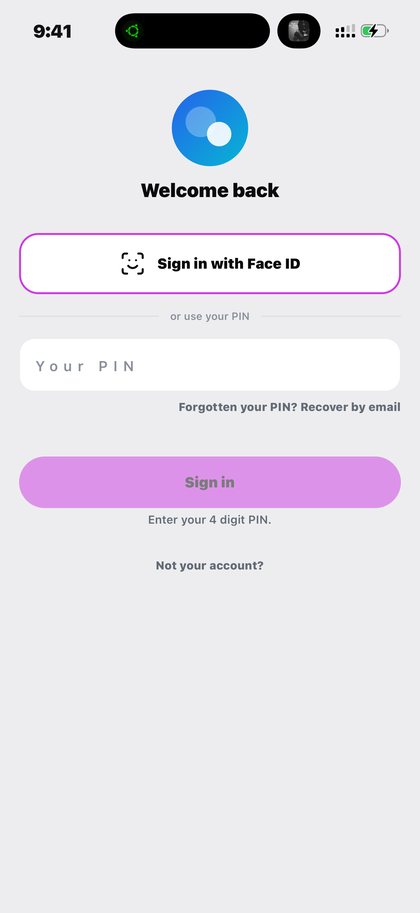
Creating an account on Kpali is deliberately small. There is no bank account to link, no BVN to supply and no document to upload before you can start, because store credit is funded with stablecoin rather than through a bank rail that would require them.
Step by step
- Open the app. The welcome screen offers Face ID or a four digit PIN.
- Set your PIN. Four digits. It gates the money screens on this device, which is where the gate belongs.
- Turn on biometrics if the phone offers them. Face ID or a fingerprint replaces typing the PIN each time without weakening it — the PIN remains the fallback.
- Add your email under Add money. It is on the deposit screen rather than buried in settings, because it is the address that gets told when money lands, and the address that recovers your access if your number changes.
- Fund store credit when you are ready. Nothing else is required first. The account exists; it simply has nothing in it yet.
What to expect
If you sign out and cannot get back in, your balance is not affected. Signing out removes the sign-in from that phone and touches nothing else. If the app only offers a PIN and will not let you back in, create an account again to get into the app, then contact support with the number you first signed up with and roughly what you were holding, and the original balance is restored.
What goes wrong
- Assuming a bank account or BVN is required. Neither is.
- Skipping the email and losing the recovery path.
- Sharing the PIN. It is the device gate on your money.
Why this matters
An account on Kpali is a place for store credit to live and a way to reach you. It is not a bank account, it does not hold your money on your behalf in the way a bank does, and it does not require the identity apparatus a bank account requires.
The PIN protects the device. The email protects your access. Those are two different jobs, and skipping the second is the single most common regret people bring to support: a phone number changes, and the recovery route they never set up is the one they now need.
None of this takes long, and that is the point worth ending on. The account is not the product; store credit is. Everything the app can do begins the moment there is a balance for it to spend, and everything before that is just making somewhere for the balance to live.
What you will see
What you see below is the app as shipped, captured rather than illustrated. These are the screens this page refers to when it says create a kpali account. Both the light and the dark theme appear, because the app follows your phone.
- Kpali sign-in screen with Face ID and a four digit PIN (light theme)
- Kpali sign-in screen in dark mode with Face ID and PIN (dark theme)
Questions
Do I need a bank account?
No. Store credit is funded with stablecoin, so no bank rail is involved and nothing needs verifying to open it.
What if I lose my phone?
Your balance is on the account, not the handset. Sign in on the new phone; if you cannot, support restores access.
Why is the email on the deposit screen?
Because that is where it matters: it is told when money lands, and it is the recovery path if your number changes.
Can I have more than one account?
One account holds one balance. Funding somebody else is done with their email on your deposit screen, not with a second account.
Read next
- Download the Kpali app — where the app comes from and what to check before installing
- Fund your wallet with stablecoin — the one step that cannot be undone, in the order the screen asks it
- PIN, biometrics and staying safe — device risk, chain risk, and the impersonation that costs most people money
- Get support — the questions answered in full, and the path to a person
What you have just read happens on a phone. The one part that can start on this website is buying store credit, at /store-credit/.
This guide describes the app. The one page here that takes payment is store credit by bank transfer; no page asks for a card.
Create an account. Sign up, PIN, and getting in without a bank account.
Kpali takes no card details on this website, ever. The one payment it takes is a naira bank transfer for store credit, on /store-credit/. A page asking for a card number for Kpali is not us.
Admin URLs are intentionally absent from navigation, sitemaps and robots allow-lists.
When Claude finishes the completeness wave, real device screenshots replace the token-built phone frames without changing the red circle targets.
Get the Kpali app when it is back on Google Play and the App Store; until then, a 'Kpali' app on any store is not ours.
Create an account. You do not need a local bank account to start.
Open Add money. Read the network warning above the address. Enter the amount. The minimum is stated before you copy.
Enter an email: yours to be notified, or theirs if this deposit should credit another person.
Send the crypto on the stated network. Wait until Home shows store credit. An address is not money.
Set the country to Algeria.
Open Airtime. Home → country → Airtime → network → number → amount → Pay.
Confirm a mobile number on the review sheet. Pay is blocked if the balance cannot cover it.
Keep the receipt. Receipt + History show the number, network, amount and status.
If status is Checking, do not retry. Read the receipt. Support is email and WhatsApp.