 Kpali
KpaliGuide
Pay a water bill
Utility account — including markets that actually sell water.
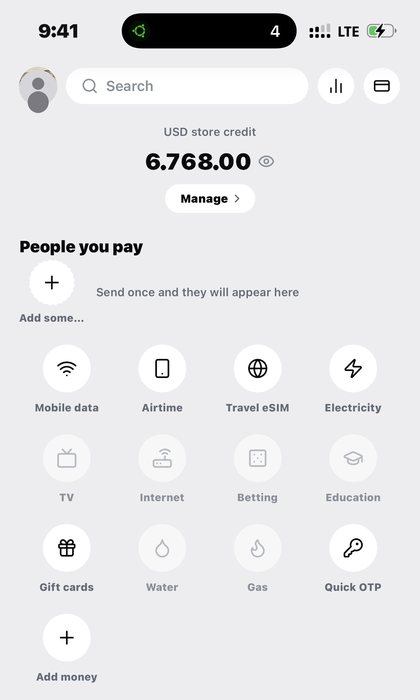
Are you settling a water utility — including markets like Niger? Settle the water utility bill on your account.
Water is the bill most international payment tools cannot touch at all, which is exactly why it is worth knowing how to pay it properly.
The steps are the same shape as the other account-based bills, and the lookup does the same protective job.
Step by step
- Install Kpali. Kpali is coming back to Google Play and the App Store soon (Android package
app.kpali). There is no browser version — money screens gate on the device. - Fund store credit. Open Add money. Choose USDT or USDC, then the network — TRC-20 credits after twenty confirmations, BEP-20 after fifteen. The warning about the network is above the address because sending on the wrong chain cannot be undone by anyone. The minimum is shown before the address.
- Decide whose credit this is. Your email in the email field notifies you. Somebody else's email credits them instead, and they are told when it lands.
- Wait for Home. Store credit appears when the deposit confirms. An address is not money.
- Set the country. The country decides what the catalogue can sell. Home is where it starts.
- Open Water. Home → country → Water → provider → account → lookup → Pay.
- Enter the recipient. The utility account is looked up and the account name confirmed before payment.
- Read the review sheet. It states the recipient and what leaves your wallet, fee included, before anything is charged.
- Pay. If store credit cannot cover the amount plus the fee, Pay does not proceed and nothing is sent to a provider.
- Keep the receipt. A settled utility account, with the name confirmed on the receipt.
What to expect
The receipt confirms the account name that was paid, which is the fact people come back for. History keeps the payment and its state. Store credit moves by the amount plus the fee.
Where the answer is no, the debit reverses and the wording is unambiguous. Where there is no answer yet, the receipt holds and you should too. On this walkthrough that matters at the last step: once you have paid for water, the receipt is the thing to read, not the Pay button to press again.
What goes wrong
- Entering a property reference where the utility bills on an account number.
- Paying without reading the returned name.
- Expecting the utility to post it the same hour.
- Assuming a missing utility means the country is unsupported — it means that utility is not reachable yet.
A worked example
A worked example. A household in Niger has a water bill and no international way to pay it. You set the country, open Water, and enter the billing account from the utility's own bill rather than a property reference. The account name returns and matches. You pay, and the receipt confirms the account name that was settled. The utility posts it on its own cycle, which is not instant and is not a failure.
If it does not work
No name comes back. The utility does not recognise that number. It is likely a property reference rather than a billing account.
The payment has not posted. Water utilities reconcile on their own cycle. The receipt records what Kpali did and when.
Your utility is not in the list. It cannot be reached yet. That is a statement about that utility, not about the country.
The name is not the household's. Do not pay it.
Pay is blocked. Amount plus fee exceeds your balance.
Worth knowing
Water utilities are among the slowest to post, and that is a fact about the utility rather than about the payment. The receipt records what Kpali did and when, with a reference. If a posting is genuinely missing days later, that reference is what makes the question answerable.
Where this works
Water is a category that reaches markets other international tools skip, including Niger. Coverage for water is decided per country and shown before you pay, so you find out what is possible while you are still choosing rather than after you have committed. Where it cannot be delivered today, the app says so with a reason attached.
The full picture — who it suits, what decides availability, what it costs and every question people ask — is on the Water page.
Pay a water bill. Utility account — including markets that actually sell water.
Kpali takes no card details on this website, ever. The one payment it takes is a naira bank transfer for store credit, on /store-credit/. A page asking for a card number for Kpali is not us.
Admin URLs are intentionally absent from navigation, sitemaps and robots allow-lists.
When Claude finishes the completeness wave, real device screenshots replace the token-built phone frames without changing the red circle targets.
Get the Kpali app when it is back on Google Play and the App Store; until then, a 'Kpali' app on any store is not ours.
Create an account. You do not need a local bank account to start.
Open Add money. Read the network warning above the address. Enter the amount. The minimum is stated before you copy.
Enter an email: yours to be notified, or theirs if this deposit should credit another person.
Send the crypto on the stated network. Wait until Home shows store credit. An address is not money.
Set the country to Algeria.
Open Airtime. Home → country → Airtime → network → number → amount → Pay.
Confirm a mobile number on the review sheet. Pay is blocked if the balance cannot cover it.
Keep the receipt. Receipt + History show the number, network, amount and status.
If status is Checking, do not retry. Read the receipt. Support is email and WhatsApp.