 Kpali
KpaliSituation
Do you need a human, quickly?
WhatsApp and email support — customer report: they actually answer.
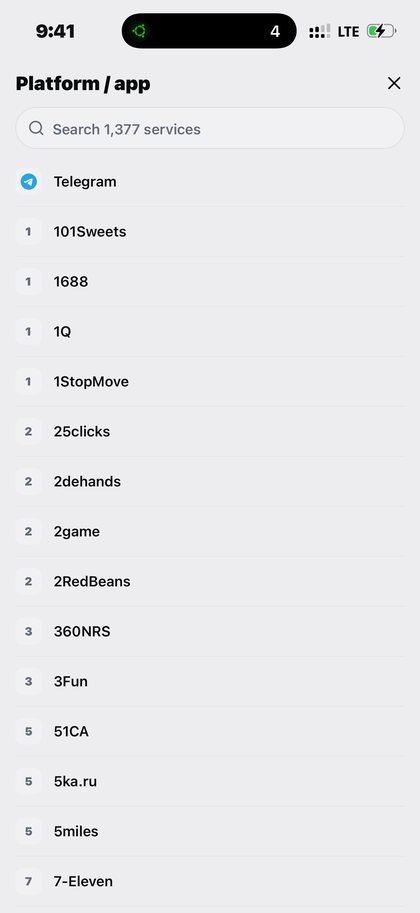
Open Quick OTP in the app after you download Kpali and fund store credit.
WhatsApp and email support — customer report: they actually answer.
The situation
Most support questions turn out to be about one specific order, which is why support lives inside the app beside the receipts rather than behind a form on a website.
The common ones are answered in full: why a card was declined, when an eSIM starts counting, whether a BVN is needed, and what happens to your balance if you sign out and cannot get back in.
What Kpali does about it
Rent a real number, receive the code, reuse the window the product gives you.
Inside the app: Home → OTP → platform → country → live price → Pay → await SMS. You are sending it to rented number (timer starts after pay).
There is no lookup for this product, so the review sheet is the check — read the recipient back before you pay.
Getting there from nothing
- Install Kpali. Opening an account asks for nothing a bank would ask for.
- Open Add money, pick the stablecoin and the network, and read the warning that sits above the address.
- Give it an email. Yours means you are told; theirs means they are funded.
- Home updates on confirmation. Until then you have sent something, not received it.
- Home → OTP → platform → country → live price → Pay → await SMS.
- Confirm the recipient on the review sheet, then Pay. It does not proceed if store credit cannot cover the total.
- Keep the receipt. A rented number, then the code itself on the await screen and on the receipt.
Read next
- Quick OTP — the detail — how it works, what it costs, and what people get wrong
- Fund your wallet with stablecoin — funding, and why the network warning sits where it does
- Read a receipt — why an unknown outcome is not a failure
All of this happens on a handset. This website explains it, and on its store-credit page alone takes a bank transfer for credit.
How to access this in the app
Home → OTP → platform → country → live price → Pay → await SMS.
How to check it
OTP await screen + receipt show the number, platform, timer and code.