 Kpali
KpaliSituation
Did you buy more than one eSIM?
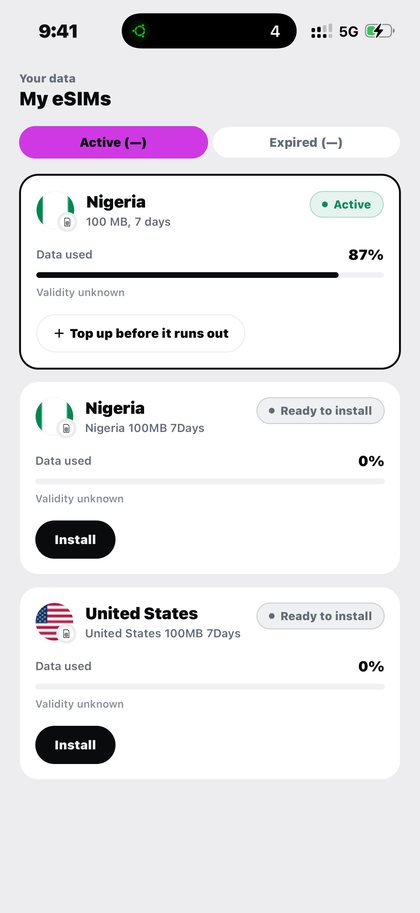
My eSIMs lists every pack, usage, and expiry — transparent, not a screenshot graveyard.
Open Travel eSIM in the app after you download Kpali and fund store credit.
My eSIMs lists every pack, usage, and expiry — transparent, not a screenshot graveyard.
The situation
Three countries in a fortnight means three eSIM packs at three different stages, and a single blended figure across them would hide the only one that matters — the one about to run out.
Each pack is tracked on its own row, with its own usage and its own validity, and packs bought but not yet installed are marked as ready rather than counted as running.
What Kpali does about it
Data for where you are going, ready before you land.
The route through the app is: Home → eSIM → destination → plan → Pay → My eSIMs → install QR. The target is your device (qr / activation code).
There is no lookup for this product, so the review sheet is the check — read the recipient back before you pay.
Getting there from nothing
- Install Kpali. Opening an account asks for nothing a bank would ask for.
- Fund with USDT or USDC, choosing the network deliberately — that choice is the irreversible one.
- Use your own email to be notified, or somebody else's to credit them instead.
- Home updates on confirmation. Until then you have sent something, not received it.
- Home → eSIM → destination → plan → Pay → My eSIMs → install QR.
- Confirm the recipient on the review sheet, then Pay. It does not proceed if store credit cannot cover the total.
- Keep the receipt. A QR code and an activation code on the receipt, and the pack itself under My eSIMs.
Read next
- Travel eSIM — the full picture: coverage, pricing, mistakes and the questions that come up most
- Fund your wallet with stablecoin — funding, and why the network warning sits where it does
- Read a receipt — why an unknown outcome is not a failure
The instructions above are for the app. The only payment this site takes is a naira bank transfer for store credit, on one page.
How to access this in the app
Home → eSIM → destination → plan → Pay → My eSIMs → install QR.
How to check it
My eSIMs tracks data usage, validity and remaining airtime/data per eSIM.