 Kpali
KpaliGuide
Reuse an OTP number
The purchase window — often 24 hours, sometimes more.
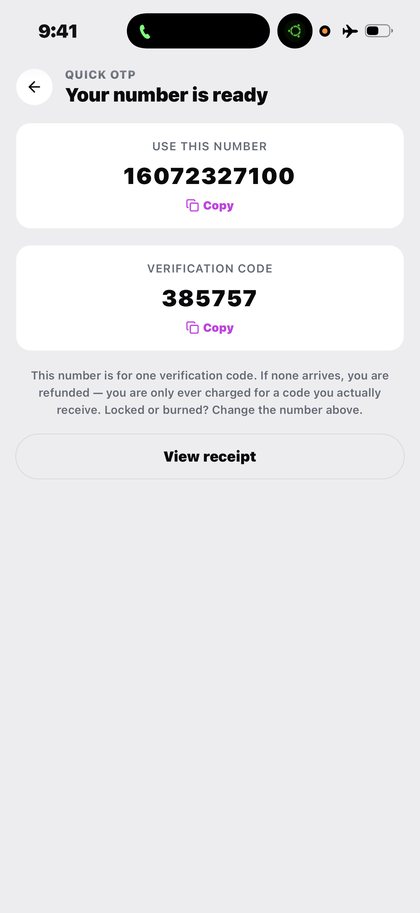
A rented number is not always single-use. Many rentals carry a window in which the same number can receive another code, and for Google products that window is often twenty-four hours and sometimes longer.
The window belongs to the product and the platform, not to optimism. The app shows what you actually have.
Step by step
- Keep the receipt. It holds the number and the platform.
- Request the next code within the window. On the same platform, on the same number.
- Watch the await screen. It shows the timer and the state while it waits.
- Read the expiry honestly. When a rental shows as expired, the window has closed. A new code then means a new rental, and a new charge.
What to expect
This is the difference that people running several accounts on one service notice most: a lockout that would otherwise need a fresh number every time can often be worked through on the number already paid for.
What goes wrong
- Assuming reuse is unlimited.
- Requesting a code on a different platform than the one the number was rented for.
- Paying again while the first rental is still live.
Why this matters
The reuse window is the part of Quick OTP that people underestimate, and for anyone running more than one account on a platform it is the part that saves the most money.
A single-use number means every verification is a fresh purchase. A number with a window means the second and third code on the same platform can often come to the number you already have — and for Google products that window is frequently twenty-four hours, sometimes longer.
What Kpali will not do is promise more window than the product actually gives. The app shows what you have, the receipt keeps the number, and when a rental expires it says so plainly. An expired window is not a reusable one, and a later code is a new rental at a new charge.
It is worth being precise about what the window is not. It is not a subscription, it is not unlimited, and it is not a promise that a platform will accept the same number twice. It is the period during which the number you already paid for remains yours to receive on. The app shows what you actually have, the receipt keeps the number, and when it closes the app says so rather than letting you assume otherwise.
What you will see
The captures below are the genuine article — the same screens the app draws on a phone. These are the screens this page refers to when it says reuse an otp number. Both the light and the dark theme appear, because the app follows your phone.
- The verification code delivered to a Kpali Quick OTP number (light theme)
- A delivered Kpali verification code in dark mode (dark theme)
Questions
How long is the reuse window?
It varies by platform. For Google products it is often twenty-four hours and sometimes longer.
Can I use the number on a different service?
No. The rental is for the platform it was bought for.
What happens after it expires?
The number returns to the pool. A new code means a new rental and a new charge.
Why is this useful for multiple Gmail accounts?
Because a lockout that would otherwise need a fresh number each time can often be worked through on the number already paid for.
Everything else about this family — coverage, cost, and the questions people ask most — is on the Quick OTP page.
Read next
- Rent a Quick OTP number — two searchable dropdowns, a live price and the await screen
- Read a receipt — the three states, and why one of them means do nothing
- Get support — the questions answered in full, and the path to a person
- History, status and expiry — finding a purchase months later, and where expiry lives
This is a manual for an installed app, plus one page selling the store credit the app spends. No page here asks for a card.
This guide describes the app. The one page here that takes payment is store credit by bank transfer; no page asks for a card.
Reuse an OTP number. The purchase window — often 24 hours, sometimes more.
Kpali takes no card details on this website, ever. The one payment it takes is a naira bank transfer for store credit, on /store-credit/. A page asking for a card number for Kpali is not us.
Admin URLs are intentionally absent from navigation, sitemaps and robots allow-lists.
When Claude finishes the completeness wave, real device screenshots replace the token-built phone frames without changing the red circle targets.
Get the Kpali app when it is back on Google Play and the App Store; until then, a 'Kpali' app on any store is not ours.
Create an account. You do not need a local bank account to start.
Open Add money. Read the network warning above the address. Enter the amount. The minimum is stated before you copy.
Enter an email: yours to be notified, or theirs if this deposit should credit another person.
Send the crypto on the stated network. Wait until Home shows store credit. An address is not money.
Set the country to Algeria.
Open Airtime. Home → country → Airtime → network → number → amount → Pay.
Confirm a mobile number on the review sheet. Pay is blocked if the balance cannot cover it.
Keep the receipt. Receipt + History show the number, network, amount and status.
If status is Checking, do not retry. Read the receipt. Support is email and WhatsApp.